
Organization skills
Skills teach Auprimus how your organization works: your definitions, your rules and the way you report. Each step uses the skill that fits it best.
Two kinds of skill
| Kind | Who sees it | Who can change it |
|---|---|---|
| Auprimus skills | Every organization | No one. They are read-only and marked Auprimus. |
| Your organization's skills | Only your organization | Your organization's admins |
Your organization's skills are never shown to, or used for, any other organization.
Browse skills
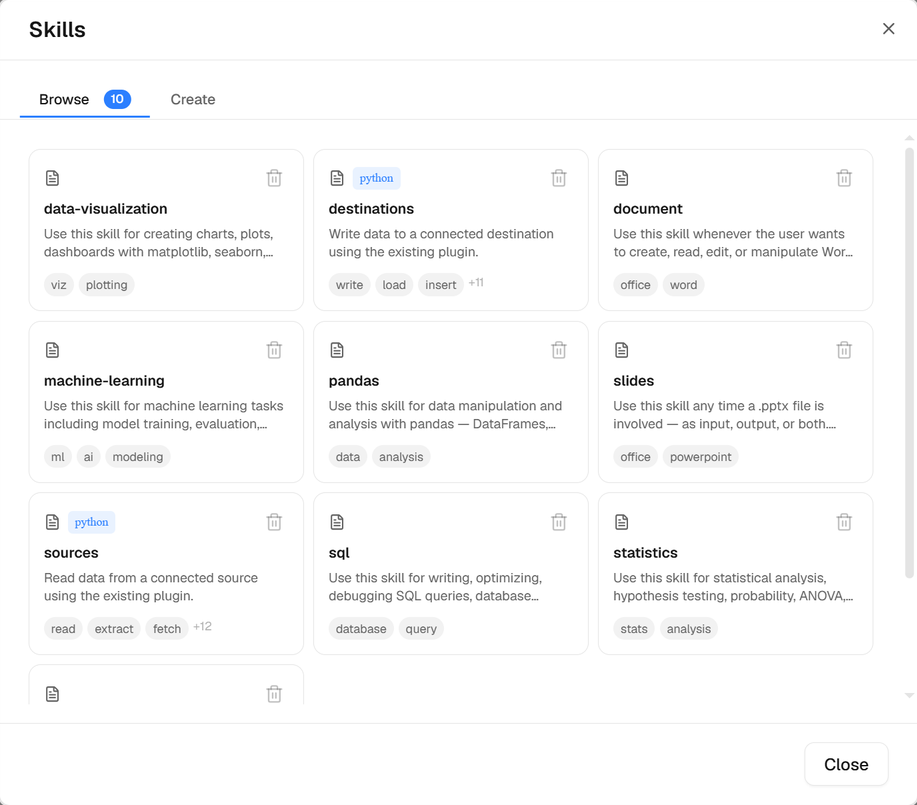
Under the message box, select Skills. The Browse tab lists every skill you can use, with its tags.
The skill format
Auprimus uses the Agent Skills format, the one Claude uses, so a skill written for Claude works here as it is. A skill is a folder: a SKILL.md file, and any files beside it.
| Part | What it holds |
|---|---|
| SKILL.md | A header between --- lines (name, description), then the instructions in Markdown |
| scripts/ | Code a step can run: Python, bash or JavaScript. Only its output is read. |
| references/ | Longer documents a step reads only when SKILL.md points to them |
| assets/ | Templates, lookup tables, images |
The name uses lowercase letters, numbers and single hyphens, such as palm-yield-rules, and is the folder's name. The description says what the skill does and when to use it: it is how a step finds the skill.
Add a skill (admins)
Open the Create tab
Choose Upload a skill to add a skill folder as a
.zip(or itsSKILL.mdalone), or Create skill to write one here.Check what it holds
An upload is checked before anything is saved. You see its name, description, what it needs and every file in it, with its scripts marked; or, when it does not follow the format, every reason why. Then select Upload.
Upload a skill
a .zipSKILL.md at its root, or in its one top-level folder; up to 10 MB, 50 MB unpacked, 500 filesor SKILL.mdup to 512 KB, with an optional LICENSE
Create skill
namerequireddescriptionrequired: what it does and when to use itcompatibilitywhat it needs, optionaltagshelp matchinglanguagesinstructionsthe guidance itselflicenseMIT by default
Uploading a skill with the same name replaces it. A name already used by an Auprimus skill is refused.
Delete a skill (admins)
In Browse, select the bin on one of your organization's skills. Auprimus skills have no bin.
How a step picks a skill
For each step, Auprimus compares the step's instruction with the skills your organization can use and takes the best match, but only when it clearly fits. A step with no good match runs without a skill rather than with the wrong one.
Scripts and your guardrails
A skill's Python script runs inside the step's own code, under every guardrail. A bash or JavaScript script runs as a program of its own, which the guardrails cannot look inside, so it runs only when Internet access is Any, and then as Install packages says: Allow runs it, Ask asks you first, Block refuses it. A scheduled run has no one to ask, so Ask refuses it there.