
Run
Choosing a model
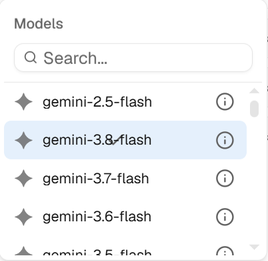
Choose the model for each run from the menu under the message box. You can switch models at any time.
Which models you can use
| Model | Available when |
|---|---|
| The free model | Always, for every organization |
| A provider's models (OpenAI, Anthropic, Gemini …) | Your organization has saved that provider's key |
| Ollama models | Your Ollama server is connected; a model not installed yet is pulled when you select it |
Locked models are greyed out, with the reason when you hover them. Search the menu by name.
Choosing
Larger models plan and write code more reliably on long, complex work; smaller ones are cheaper and faster for simple steps. The run's tokens and cost are shown live, so you can compare models on the same workflow. The info icon next to a model shows its details.
NoteAdding a key: API keys. Your own hardware: Local models with Ollama.
Something wrong or missing? Write to [email protected] about “Choosing a model”.Updated 26 Sep 2026