
Data controls
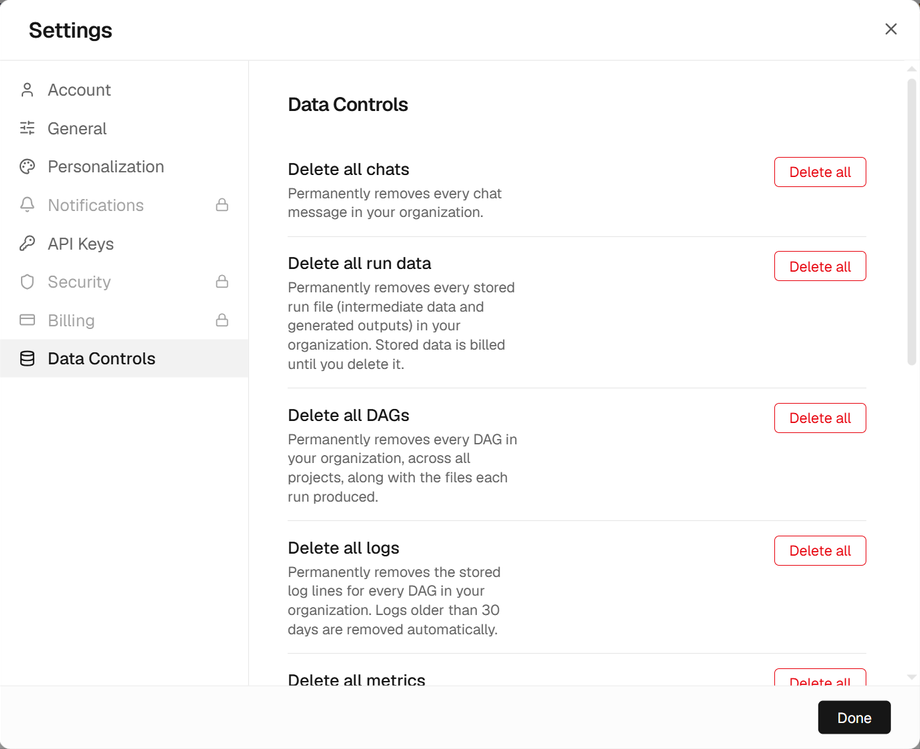
Delete any of your organization's data, or export all of it. Open Settings → Data Controls.
Export
Export my data downloads every project, workflow, chat, usage record, saved script and organization skill as a JSON archive. Connector credentials are left out, with only their field names listed. Stored run files are listed, not included; download them from Files Explorer.
Delete
| Action | Removes |
|---|---|
| Delete all chats | Every chat message in your organization. |
| Delete all run data | Every stored run file: intermediate data and generated outputs. |
| Delete all DAGs | Every workflow in every project, with the files each run produced. |
| Delete all logs | The stored log lines of every workflow. |
| Delete all metrics | The recorded metrics of every workflow. |
| Delete all lineage | The record of which step consumed and produced what. |
| Delete all cost records | Every usage and cost record, including the spend shown in Usage. |
Delete one project
To delete a single project with everything in it, open the project's ··· menu in the Projects panel and choose Delete project. Its workflows and their files, scripts, schedules and run history, its chat, its audit records and who may access it are deleted with it. Its usage stays in Usage, as spend that already happened.
Automatic removal
Logs, baggage and metrics older than 30 days are removed automatically, and traces sooner. Stored run files are kept, and billed by size, until you delete them; set a project's retention in Guardrails, on the DAG tab: Delete run files after (7 days, 30 days, 90 days, 1 year or forever). Runs still executing are never removed.