
Set up
API keys
Bring your own provider key and you own the token bill. Keys belong to your organization and unlock that provider's models for everyone in it.
Add a key
Open Settings → API Keys
Open Settings from the top-right corner and choose API Keys.
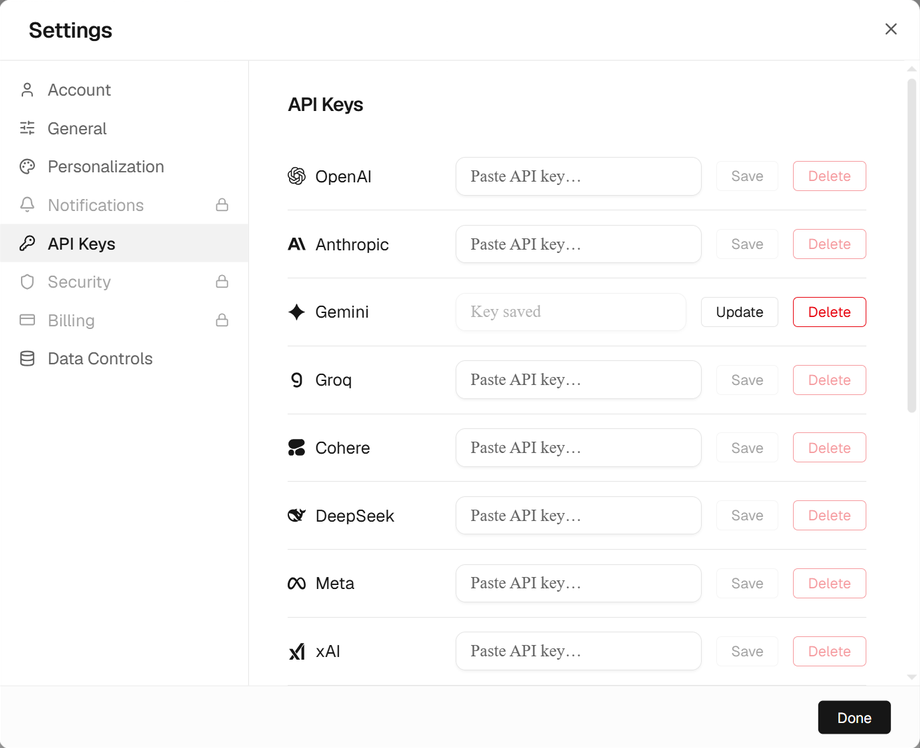
Paste the key and save
Paste the key in the provider's row and select Save. That provider's models unlock in the model menu straight away.
Providers
| Provider | Used for |
|---|---|
| OpenAI, Anthropic, Gemini, Groq, Cohere, DeepSeek, Meta, xAI | Chat models in the model menu |
| Voyage AI | Embeddings and reranking |
| ClickUp | The ClickUp integration |
Open models on your own hardware need no key: see Local models with Ollama.
Replace or remove a key
A saved key is never shown again. To replace it, paste the new key in the same row and select Update. To remove it, select Delete; the provider's models lock again.
Without a key
One model is available to every organization without a key. Every other model shows as locked, with "Add your provider API key in Settings to unlock this model."
TipKeys are encrypted at rest and never sent back to the browser. You pay the provider directly for tokens; Auprimus shows the cost of every call in Usage.
Something wrong or missing? Write to [email protected] about “API keys”.Updated 26 Sep 2026