
Audit & outputs
The step console
Every step keeps a full record of what it did. Select a step in the DAG tab to open its console.
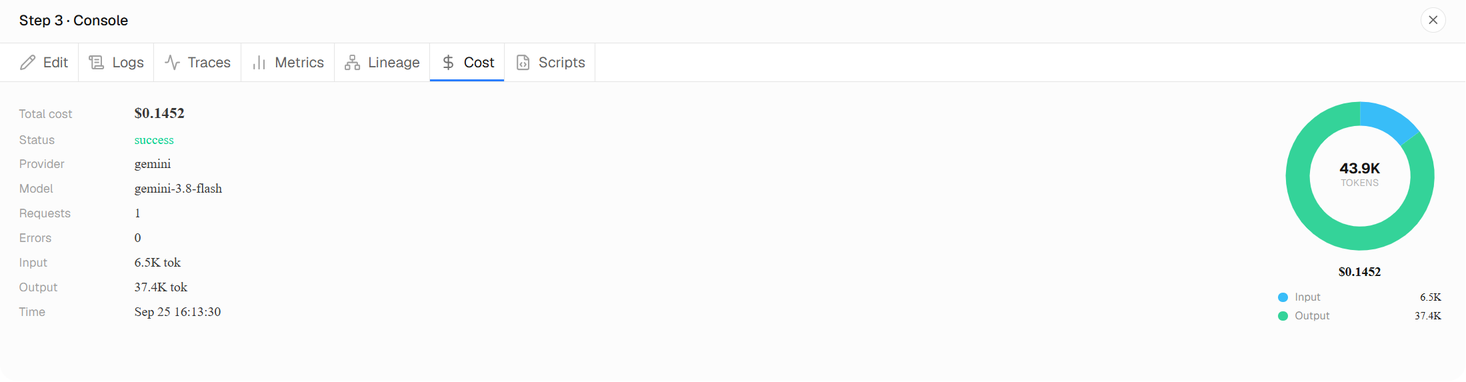
Tabs
| Tab | What it shows |
|---|---|
| Edit | The step's instruction: what this step was asked to do. |
| Logs | What happened while the step ran, in order: starting, waiting, succeeding or failing, its errors and its approvals. |
| Traces | The step's work as a timeline: its model calls, scripts and connector calls, and how long each took. |
| Metrics | Measurements recorded while the step ran: durations, retries, tokens, CPU and memory. |
| Lineage | What data the step consumed and what it produced, and which steps or sources they came from. |
| Baggage | The context the step's calls carried: organization, project, session, workflow, step and run. |
| Cost | Each model call and connector use: provider, model, input and output tokens, status and cost. |
| Scripts | The code the step ran, every version of it, and who or what wrote each one. Open code shows it in the editor. |
A step that ran more than once has one record per run: pick a run at the top of a tab to see that run only. Select a record to see every field it holds.
The Scripts tab is covered in Scripts and replay. What each record is, and how long it is kept, is in Auditing.
How long records are kept
Logs, baggage and metrics older than 30 days are removed automatically; traces are kept for a shorter time. You can delete any of these records sooner, or export them, from Data controls.
Something wrong or missing? Write to [email protected] about “The step console”.Updated 11 Oct 2026