
Connectors
Connect Auprimus to the systems you already run. Add credentials once, and every run in the project can use them.
Five families of connector
A connector is read and written over the same connection: connect a system once, and a run can read from it, write to it, or both. The catalogue groups connectors by how they connect.
| Family | What it covers |
|---|---|
| Databases | Databases, warehouses and vector stores: PostgreSQL, MySQL, Snowflake, BigQuery, MongoDB, Redis, Pinecone. |
| Files and storage | Object storage, file servers and sheets: Amazon S3, Google Cloud Storage, Azure Blob Storage, SFTP, Google Sheets. |
| Streams and queues | Event streams and message queues: Apache Kafka, Amazon Kinesis, Google Cloud Pub/Sub, Amazon SQS, MQTT. |
| APIs | Services reached over their API: Salesforce, HubSpot, Stripe, Slack, Notion, and AI agents. |
| MCP servers | Servers that expose tools and data over the Model Context Protocol. |
Add a connector
Select the project
A connector belongs to a project. Open the project first; if none is selected, Auprimus asks you to select one before it connects anything.
Open Connectors from the chat bar
Under the message box, select Connectors.
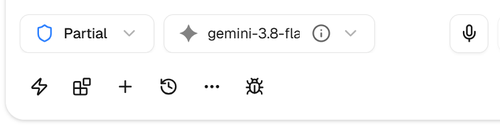
Pick the family, then the connector
Choose a family on the left. Available lists everything you can add; search by name, then select Connect.
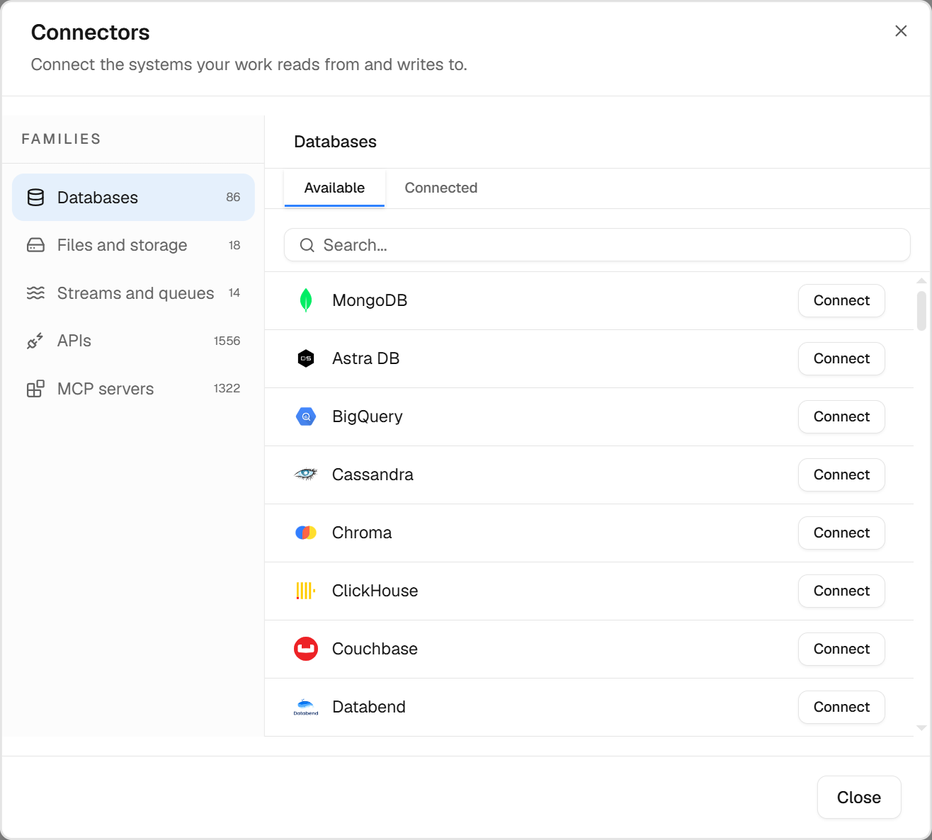
The number next to a family is how many you have connected, or the catalogue size when none are. Fill in the credentials and connect
Auth is how Auprimus signs in; Scope narrows what it reads or writes. Select Connect to save. For PostgreSQL:
Auth
hostserver addressportusually 5432databaseusernamepassword
Scope
schemafor example publictableoptional
TipEvery Auth field is masked as you type. Once saved, credentials are encrypted and never shown again, not even to you.
Its guardrails
Under the credentials, each connector has its own Guardrails: Read, Write and Delete or overwrite, each Allow, Ask or Block. By default a run may read, asks you before it writes, and never deletes. The plan says what each step does with each connector, and a step asks or stops before it starts. See Guardrails.
Update or disconnect
The Connected tab lists what the project already uses. Select the pencil to change credentials, or the bin to disconnect.
When you edit, the saved values are not shown. Leave a field blank to keep what is saved; type in it to replace it.
How runs use connectors
When you describe an outcome, Auprimus plans the steps against the connectors in the project. Each step's code runs in an isolated process that receives only the credentials that step needs.
palm_blocks".If connecting fails
The message shows the reason the system gave. Check that the host is reachable from the internet, the port is open, and the user can read the schema set in Scope. Still stuck? Write to [email protected] with the connector name and the message.